

Ever wondered what happens when a cashier scans a product and hears that familiar “beep”? In less than a second, a barcode scanner identifies the product, retrieves its information, and displays the price. Here’s a look at the technology that makes it all possible.

What Is a Barcode?
A barcode is a machine-readable representation of information using a pattern of black bars and white spaces. Each pattern corresponds to a unique number or code that identifies a product, package, or asset.
Barcodes are used in:
- Retail stores
- Warehouses
- Hospitals
- Libraries
- Manufacturing
- Logistics and shipping

Step 1: The Scanner Illuminates the Barcode
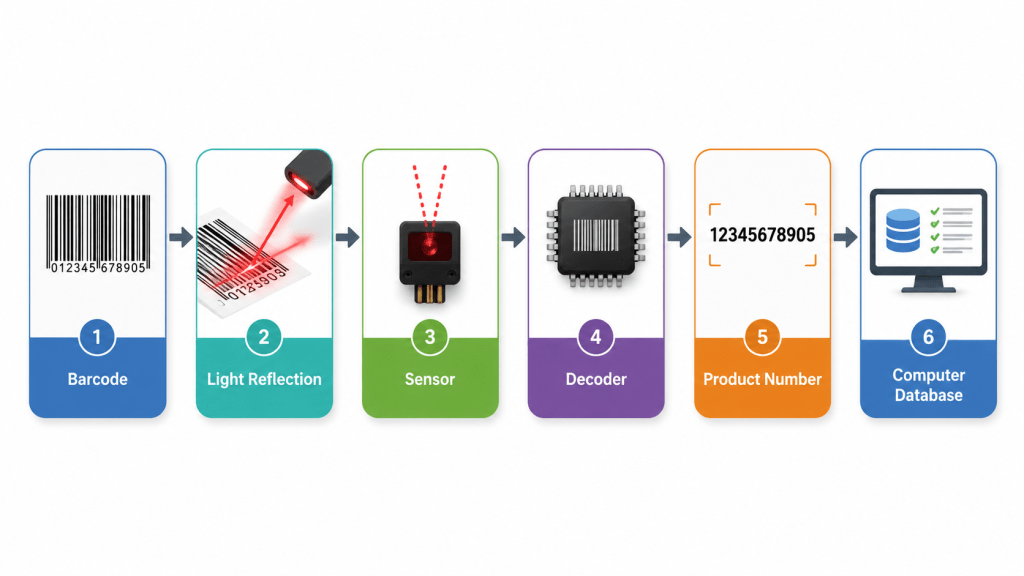
When the scanner is pointed at a barcode, it shines a beam of light—typically from a laser or an LED—onto the printed code.
The black bars absorb most of the light, while the white spaces reflect it back toward the scanner.
Light Reflection

Step 2: A Sensor Detects the Reflected Light
Inside the scanner is a light sensor that measures the reflected light.
- White spaces produce a stronger reflected signal.
- Black bars produce a weaker reflected signal.
The sensor converts these changing light levels into electrical signals.
Internal Components of a Barcode Scanner

Step 3: The Scanner Decodes the Pattern
The electrical signals are processed by a decoder.
The decoder measures the width and spacing of the bars and translates them into numbers according to barcode standards such as:
- UPC
- EAN
- Code 39
- Code 128
For example:
Black and white pattern↓110100101011...↓890123456789
The result is the product’s identification number.
Barcode Decoding Process
Step 4: The Computer Looks Up the Product
The decoded number is sent to a computer or point-of-sale (POS) system.
The computer searches its database and instantly retrieves details such as:
- Product name
- Price
- Stock availability
- Tax information
- Discounts
This process typically takes only a fraction of a second.
Different Types of Barcode Scanners
1. Laser Scanners
Use a laser beam to read traditional 1D barcodes. Common in supermarkets.
2. CCD Scanners
Use an array of tiny light sensors instead of a laser. Durable and reliable for short-range scanning.
3. Image-Based Scanners
Capture an image of the barcode and decode it using software. They can often read damaged or poorly printed codes.
4. 2D Barcode Scanners
Designed to read QR codes, Data Matrix codes, and other two-dimensional barcodes that can store much more information than traditional 1D barcodes.
Comparison of Scanner Types

Real-World Applications
Barcode scanners have become essential in many industries.
- Retail: Faster checkout and inventory tracking.
- Warehousing: Package identification and stock management.
- Healthcare: Patient identification and medication verification.
- Manufacturing: Product tracking throughout production.
- Logistics: Shipment tracking and delivery confirmation.
Advantages of Barcode Scanners
- Fast and accurate data entry
- Reduced human error
- Improved inventory management
- Faster customer service
- Lower operational costs
- Easy integration with business software

