
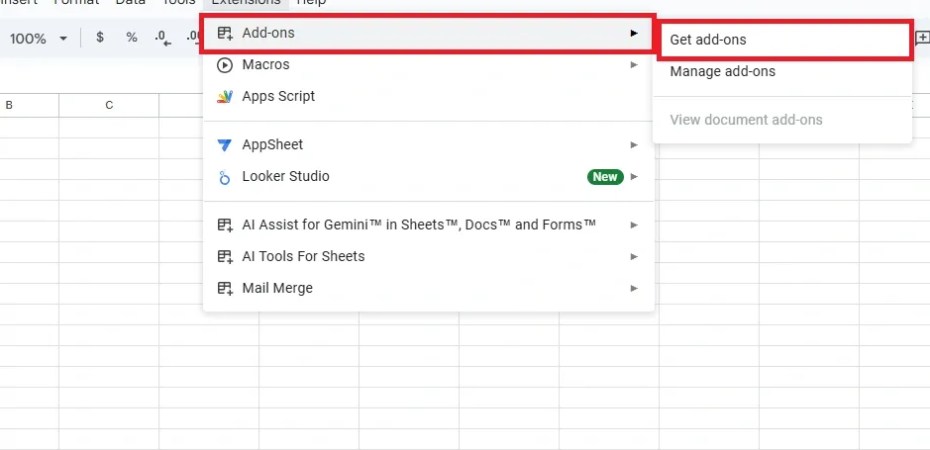
Google Sheets extensions—officially called Add-ons—expand what Sheets can do beyond its built-in features. They’re installed from Extensions → Add-ons → Get add-ons and integrate directly into your spreadsheet.
Here are practical examples of Google Sheets extensions (add-ons) and what they help you do:
📊 1. Supermetrics
Use: Pull data from marketing platforms into Sheets
Example:
- Automatically import your Google Ads, Facebook Ads, or LinkedIn Ads performance every morning.
- Build dashboards that update themselves with campaign stats.
✉️ 2. Yet Another Mail Merge (YAMM)
Use: Send personalized emails based on spreadsheet data
Example:
- You have a sheet with Name, Email, Discount Code.
- YAMM sends each person a custom email with their discount code.
- Great for newsletters, follow-ups, or invitations.
🔄 3. Zapier for Google Sheets
Use: Connect Sheets with thousands of apps
Example:
- When a new row is added in Sheets, automatically create a task in Todoist or send a Slack message.
- No coding required.
🧹 4. Power Tools
Use: Simplify data cleanup & formatting
Example:
- Remove extra spaces, delete duplicates, merge/split columns.
- Convert data formats quickly (e.g., dates, text cases).
📈 5. Autocrat
Use: Generate documents (PDF/Google Doc) from Sheets
Example:
- Create certificates, invoices, or reports from spreadsheet rows.
- Autocrat can auto-email them too.
📁 6. Advanced Find & Replace
Use: Search across sheets with powerful filters
Example:
- Find all instances of a term across multiple tabs or workbooks.
- Replace with specific rules (case-sensitive, whole cells only, etc.).
📅 7. Calendar Events Creator
Use: Create Google Calendar events from rows
Example:
- You list Event name, Date, Time, Guests in Sheets.
- The add-on creates all those events in your calendar in one click.
📦 8. AppSheet
Use: Turn your Sheets into mobile/web apps
Example:
- A restaurant turns its inventory sheet into an internal mobile app.
- Staff can update stock from their phones.
📊 9. Solver
Use: Perform advanced “what-if” analysis
Example:
- Maximize profits by changing pricing or product mix.
- Useful in finance, logistics, and modeling scenarios.
🧠 10. AI Assistant for Sheets (some add-ons)
Use: Generate formulas, analyze trends, or summarize data
Example:
- Ask the add-on to create a complex formula for you (like dynamic ranges or lookups).
- Summarize sales trends from raw data.
 Code Help by Asmi