
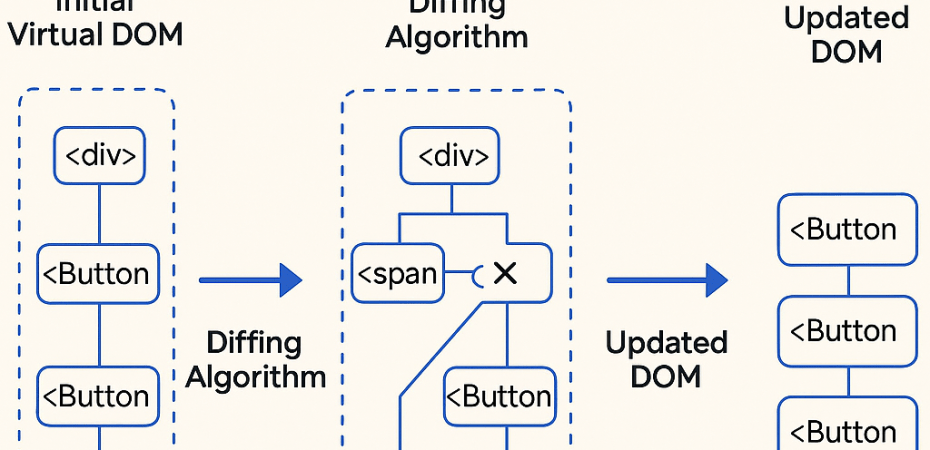
Reconciliation is the process React uses to update the DOM when the state or props of a component change. Rather than re-rendering the whole page, React uses a virtual DOM and a diffing algorithm to find out what has changed and updates only the parts that need to be changed.
How Reconciliation Works
- Render Phase
- When a component’s state or props change, React re-renders the component and generates a new virtual DOM tree.
- Diffing Algorithm
- React compares the new virtual DOM with the previous one.
- It calculates the minimal number of operations required to update the real DOM to match the new virtual DOM.
- Update Phase
- React applies those changes to the real DOM efficiently.
Optimization Rules in Reconciliation
React follows a few assumptions to make reconciliation faster:
1. Element Type Changes
If the element type changes (e.g., <div> → <span>), React destroys the old node and creates a new one.
2. Component Type Changes
If the component type changes, React unmounts the previous component and mounts a new one.
3. Same Type, Different Props
React updates the props and re-renders only what’s necessary.
Keys and Reconciliation
- When rendering lists, React uses
keyprops to identify elements. - A good key helps React understand which items changed, were added, or removed.
- Without proper keys, React may unnecessarily re-render items, leading to performance issues or bugs.
// Good
{items.map(item => (
  <ListItem key={item.id} value={item.value} />
))}

// Bad
{items.map((item, index) => (
  <ListItem key={index} value={item.value} />
))}
Why Reconciliation is Important
- Performance: Minimizes expensive DOM operations
- User Experience: Ensures smooth, responsive interfaces
- Predictability: Helps maintain UI consistency across renders
Example Usage
import React, { useState } from 'react';

export default function App() {
  const [users, setUsers] = useState([
    { id: 1, name: 'Alice' },
    { id: 2, name: 'Bob' },
    { id: 3, name: 'Charlie' },
  ]);

  const addUser = () => {
    const newUser = { id: 4, name: 'Zara' };
    setUsers([newUser, ...users]);
  };

  return (
    <div>
      <button onClick={addUser}>Add User</button>
      <UserList users={users} />
    </div>
  );
}

function UserList({ users }) {
  return (
    <ul>
      {users.map((user) => (
        <li key={user.id}>{user.name}</li>
      ))}
    </ul>
  );
}
What Happens Behind the Scenes?
- With correct keys (
user.id), React knows thatAlice,Bob, andCharliejust moved down and reuses their DOM nodes. - With index as key, React thinks all elements changed, and recreates the entire list, even though only one item was added.
 Code Help by Asmi